🧠 Self-Hosted Agents – Deep Dive
Agent Architecture, Security, Scaling & Pitfalls
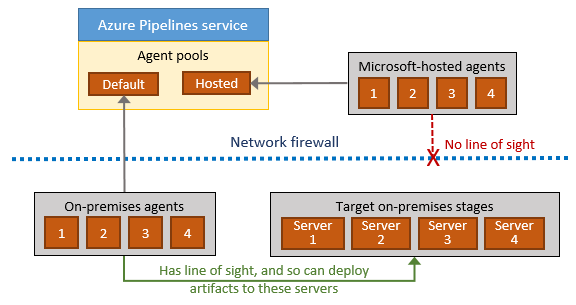
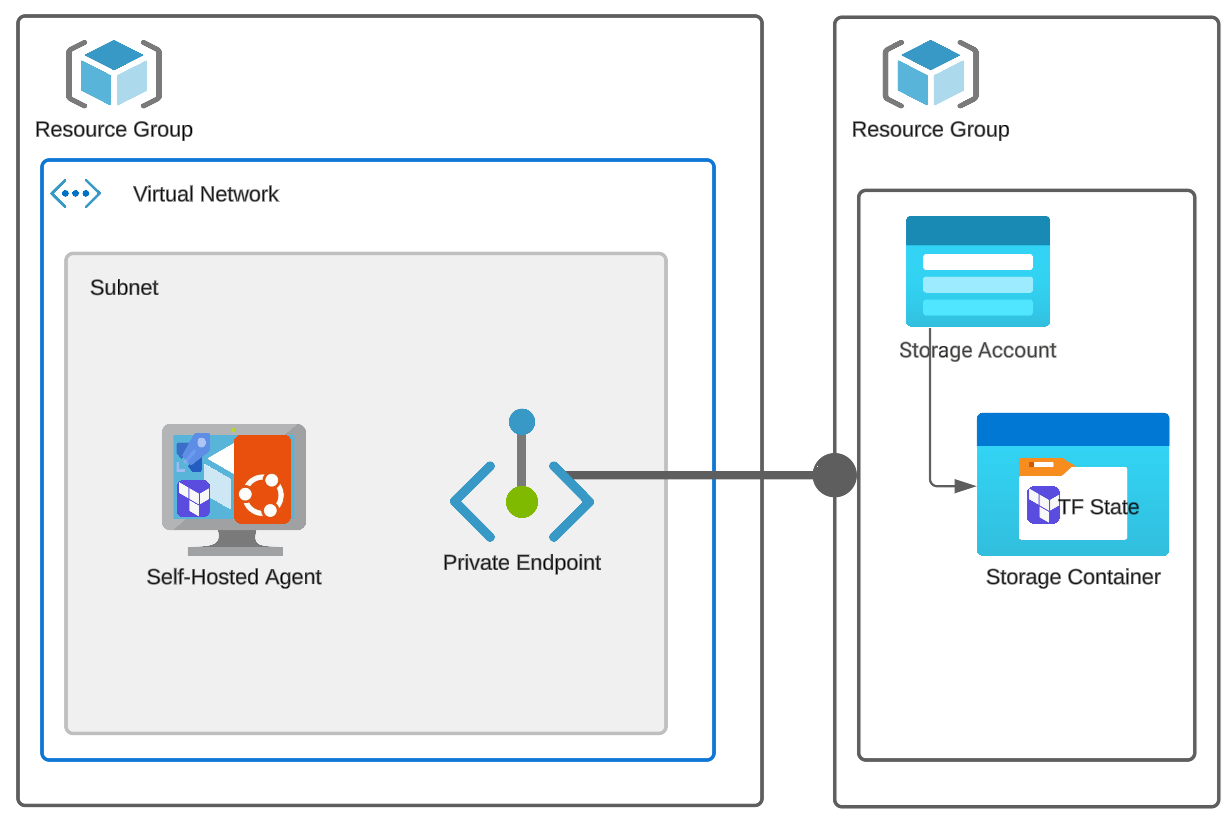
A self-hosted agent is your machine, running Microsoft’s agent software, executing pipeline jobs under your responsibility. Azure DevOps controls what runs. You control where, how, and with what privileges it runs.

<div align="center" style="background-color: #2b3436ff; border-radius: 10px; border: 2px solid">
graph TD
    A@{ shape: hex, label: "🧠 Azure Pipelines Service" }
    B@{ shape: hex, label: "📡 Agent Listener" }
    C@{ shape: processes, label: "🤖 Self-Hosted Agent" }
    D@{ shape: processes, label: "🖥️ VM / Server / Container" }
    E@{ shape: rect, label: "⚙️ Tools, Files, Network" }

    A --> B
    B --> C
    C --> D
    D --> E

    classDef animate stroke-dasharray: 9,5,stroke-dashoffset: 700,animation: dash 22s linear infinite;
    class A,B,C,D,E animate
🔴 Problem: “Hosted Agents Are Too Slow / Limited”
Typical reasons teams move to self-hosted agents:
- Terraform plans take too long
- Docker builds are slow
- Builds need private network access
- Tools must be preinstalled
- Compliance forbids shared infrastructure
This is exactly when self-hosted agents are correct.
1️⃣ Self-Hosted Agent Architecture (What Actually Runs)
🧠 What Is a Self-Hosted Agent?
It consists of:
- A machine (VM, bare metal, container)
- Azure Pipelines Agent software
- An agent pool registration
Once registered:
- Agent polls Azure DevOps
- Receives jobs
- Executes them locally
🧪 Installation Reality
On the machine:
./config.sh
./run.sh
The agent:
- Opens an outbound HTTPS connection
- No inbound ports required
- Long-polling for jobs
✔ Firewall-friendly
✔ Secure by default
🔑 Key Architectural Rule
Azure DevOps never connects into your machine. The agent connects out.
This is why self-hosted agents work even behind:
- Firewalls
- NAT
- Corporate networks
2️⃣ Security Boundaries (EXTREMELY IMPORTANT)
🧨 Truth Most Teams Learn the Hard Way
A self-hosted agent executes pipeline code with the permissions of the machine.
This has massive implications.
❌ Dangerous Setup (Common Mistake)
-
Agent runs as root / Administrator
-
Pipeline runs arbitrary scripts
-
Any repo contributor can:
- Delete files
- Read secrets
- Exfiltrate data
This is a supply-chain vulnerability.
✅ Secure Agent Design (Senior Pattern)
| Layer | Best Practice |
|---|---|
| OS user | Dedicated low-privilege user |
| Agent pool | Restricted to trusted pipelines |
| Repo access | Protected branches |
| Secrets | Key Vault, not files |
| Network | Scoped access |
🧪 Example: Least Privilege Agent
- Linux user:
azagent - No sudo
- Access only to required folders
- Network access limited via NSGs
✔ Safer
✔ Auditable
✔ Compliant
3️⃣ Agent Pools & Trust Boundaries
🧠 Critical Design Rule
Agent pools are trust boundaries.
Never mix:
- Prod deployments
- Dev builds
- Untrusted repos
❌ Bad Design
Agent Pool: Default
Used by:
- All pipelines
- All repos
- All environments
❌ One compromised pipeline = full access
✅ Correct Design
Agent Pools:
- build-linux
- build-windows
- deploy-prod
- deploy-nonprod
Each pool:
- Has limited permissions
- Serves a specific purpose
4️⃣ Scaling Strategies (Where Most Fail)
Self-hosted agents do not scale automatically unless you design them to.
🧱 Strategy 1: Static Agents (Simplest)
- Fixed number of VMs
- One agent per VM
✔ Easy
❌ Queues build up
❌ Underutilization
Used for:
- Low-volume pipelines
- Stable environments
🧠 Strategy 2: VM Scale Set (VMSS) Agents (Enterprise Standard)
Azure DevOps can automatically scale agents using VMSS.
How It Works
- Pipeline queues job
- Azure DevOps requests VM
- VM boots from image
- Agent auto-registers
- Job runs
- VM is deleted
✔ Elastic ✔ Cost-efficient ✔ Secure
This gives you hosted-agent behavior on your infrastructure.
🧪 Real Example Use Case
- Terraform pipelines
- Docker-heavy builds
- Private registry access
- On-demand scale
🔥 Senior Insight
VMSS agents are the default choice for serious self-hosted setups.
5️⃣ Maintenance Pitfalls (Where Teams Suffer)
Self-hosted agents shift responsibility to you.
❌ Pitfall #1 – Tool Drift
- Node version upgraded
- Terraform changed
- Docker updated
Pipelines start failing randomly.
✅ Fix: Immutable Images
- Bake tools into VM image
- Version the image
- Roll out changes deliberately
Same principle as:
- Docker images
- AMIs
❌ Pitfall #2 – Dirty Agents
- Leftover files
- Cached credentials
- Broken workspaces
Causes:
- Flaky builds
- Security leaks
✅ Fix
- Clean work directories
- Use disposable agents (VMSS)
- Periodic rebuilds
❌ Pitfall #3 – Agent Starvation
Symptoms:
- Jobs stuck in queue
- “Waiting for agent…”
Cause:
- Too few agents
- No autoscaling
✅ Fix
- Monitor queue length
- Scale pools
- Use VMSS or containers
6️⃣ Self-Hosted vs Hosted (Reality Comparison)
| Aspect | Hosted | Self-Hosted |
|---|---|---|
| Setup | None | Required |
| Control | Low | High |
| Performance | Medium | High |
| Security | Managed | Your responsibility |
| Network | Public only | Full access |
| Scaling | Automatic | Manual / VMSS |
🧠 Mental Model (Lock This In)
Hosted Agent  = Convenience
Self-Hosted   = Responsibility
VMSS Agent    = Best of both
🧠 Memorization Tips
🔑 Mnemonic: "A-S-S-M"
| Letter | Meaning |
|---|---|
| A | Agent runs as OS user |
| S | Security is yours |
| S | Scaling is manual unless VMSS |
| M | Maintenance is mandatory |
❌ Top Self-Hosted Agent Mistakes
| Mistake | Consequence |
|---|---|
| Running as root | Security breach |
| One pool for all | Trust collapse |
| No image versioning | Random failures |
| No autoscaling | Queue backlog |
| Ignoring cleanup | Flaky builds |